A Feet and Inches Calculator Excel Users Can Build on Windows
Build a feet and inches calculator in Excel for Windows with numeric inputs, total inches, height differences, and normalized feet-and-inches results.
On this page
A Feet and Inches Calculator Excel Users Can Build
Microsoft 365 on Windows is available in both the 32-bit (x86) and 64-bit (x64) versions. Here’s how to create a feet-and-inches calculator in Microsoft 365 Excel on Windows.
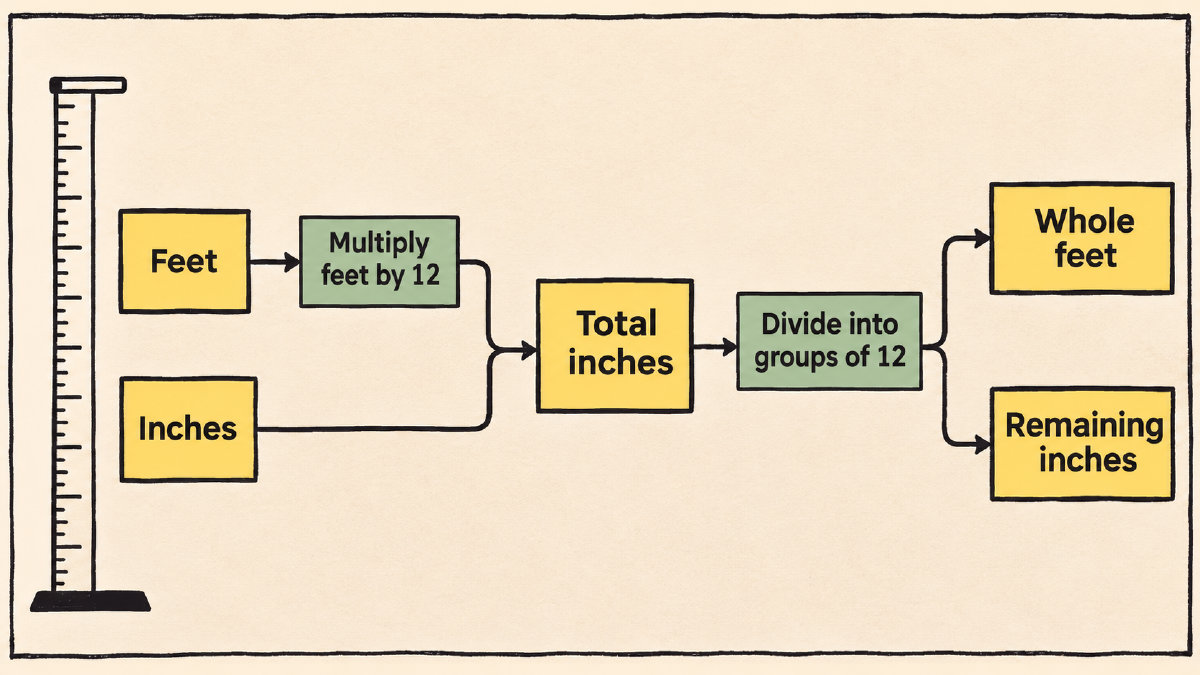
You can create separate numeric inputs for feet and inches, then combine those into total inches and apply either formula to compute the sum of the feet and inches: =A2*12+B2, or =CONVERT(A2,"ft","in")+B2. The CONVERT function converts between units of measure, such as from foot to inch.
Once you’ve converted all the feet and inches to total inches, then use division and subtraction to normalize them into whole numbers of feet and remaining inches. For instance, 5 feet plus 14 inches adds up to 74 inches. Using quotient and remainder operations, 74 inches is equivalent to 6 feet plus 2 inches.
These total-inch cells are especially useful when calculating differences between two people’s heights. If you have the height of one person (e.g., 5 feet 9 inches) and another person (e.g., 6 feet 2 inches), the difference between the two would be five inches. Again, you could subtract the smaller number from the larger to get the difference.
If you have a decimal-foot measurement (e.g., 5.9 feet), that doesn’t break down very nicely using our feet-and-inches system. However, if we first convert the entire decimal-foot measurement to inches before we split it into feet and inches, we’ll get 70.8 inches. We could also just split it manually into five feet and 10.8 inches. Five feet and nine inches is a different measurement, adding up to 69 inches.
Finally, you can enter fractions directly. You can distinguish this from other formats by entering the leading zero. In addition to the leading zero, there’s also Text formatting that prevents automatic date conversion; however, you’ll probably prefer entering the fractions as numbers rather than relying on Text formatting.
Build the Feet and Inches Calculator
Open a new blank worksheet. Enter “feet” in A1 and “inches” in B1. Add numeric feet values in column A and numeric inches values in column B, starting in row 2.
In the Total-Inch column (column C), add two equivalent formulas to calculate the total inches:
= A2 * 12 + B2
= CONVERT(A2, "ft", "in") + B2
The first formula simply multiplies the number of feet by twelve, then adds the inches. The second uses the CONVERT function to convert the value from feet to inches, then adds the inches again.
Now, in column D, insert a formula to normalize the total inches into feet:
= QUOTIENT(C2, 12)
This formula divides the total inches by twelve and returns only the integer portion of the result. The remainder is discarded.
Finally, in column E, use the following formula to return the number of remaining inches after the total has been divided by twelve:
= C2 - 12 * D2
The result should now display the total number of feet and inches, normalized to whole feet and inches.
Compare Decimal Feet and Feet and Inches
Next, we want to compare the results of these two different methods: the decimal foot calculation and the feet-and-inches breakdown.
I entered 5.9 feet into cell A2 and 0 into B2, which should be 5 feet 10.8 inches, or 70.8 inches. Applying the first formula, we see that it does indeed equal 70.8 inches. When we applied the feet-and-inches breakdown, we had a slightly different result: 5 feet plus 9 inches added up to 69 inches.
However, if we tried converting 5.9 feet to inches directly, it equals 70.8 inches. But that’s because the 0.9 feet translates into 10.8 inches, not 9 inches. In fact, the 0.9 feet is a little less than a full foot, and we’d need to add 10.8 inches to the five feet. So the decimal method is accurate; we just need to remember that 5.9 feet doesn’t mean 5 feet 9 inches.
Enter Decimal Inches and Fractions
Instead, what’s better is to simply input your values using the feet-and-inches approach. If you’re going to do this, make sure that the numbers are entered correctly. If you have a decimal inch, like 9.5 inches, simply type that into the appropriate cell.
For standalone fractions, like ½ inch or ¾ inch, you can enter those as 0 1/2 or 0 3/4, respectively. This will preserve the arithmetic functionality of the worksheet and will ensure that you get the right answer. Note, though, that the zero and space are needed before the fraction. Otherwise, you might accidentally end up converting the data into a date, and it won’t look correct. Once you press Enter, the leading zero will disappear, leaving just the fraction.
When you press Enter, the cell will show the fraction as text, but you can click on it to select the cell, and you’ll see that it’s actually formatted as Fraction instead of Text. Text formatting will prevent automatic conversion of numbers to dates, so you can also format the cell as Text, too.
You might find that some people don’t use the feet-and-inches method at all. If they do, they tend to enter their measurements as decimals. However, that doesn’t really help with the arithmetic calculations that you might want to perform. Instead, what’s better is to simply enter the numbers in fractions. Then, you can do the math that the worksheet requires.
Calculate the Sum or Difference Between Heights
As a final check, you can add the totals together. Let’s suppose that you had the following two people’s heights: 5 feet 9 inches and 6 feet 2 inches. If you added them together, you’d get 11 feet 11 inches. Alternatively, if you wanted to calculate the difference, you’d subtract the smaller height from the larger, which is 5 inches, or 0 feet 5 inches. You can use the formula =C2+C3 or =ABS(C2-C3) to calculate the sum or difference respectively. Either way, the quotient-and-remainder calculation applies to either result, producing two separate numeric columns labeled feet and inches.
Sources
Try the height tools
Compare two to ten people or convert a height precisely.
Compare heights →Height converter →Related articles
What Level of Measurement Is Height? Why It Uses a Ratio Scale
What level of measurement is height? Learn why numerical height uses a ratio scale, what true zero means, and when height categories are ordinal.
Read articleHow to Read Height Measurement in Mexico
Understand height measurement in Mexico through official metric units, decimal-meter examples, and the documented phrase “un metro 14.”
Read articleHow to Read Height Measurement on Scale Rods: 402KL Markings
Learn how to read height measurement on scale rods using the 402KL's inch and centimeter markings, including its ⅛-inch and 1 mm graduations.
Read article